Which is better for workstation i9 OR Xeon ?

12 monitors and all the apps that make use of that screen estate or browser windows. Good luck with anything less than 32gb.i speak of own experience with 10 screens on a single machine.

HOGWASH! Your task manager, at "peak usage", will tell you how much RAM you use. Any large amount above that is worthless and wasted.
 
12 monitors and all the apps that make use of that screen estate or browser windows. Good luck with anything less than 32gb.i speak of own experience with 10 screens on a single machine.

IF such a thing applies to a trader, he should know that via "Task Manager". No sense guessing about it, just look it up.
 
That's like saying "so far on only a few occasions my needs exceed 4 cores so let's buy 4 cores". There is a sweet spot and memory prices favor that sweet spot, you hardly save any money by going 16gb vs 32,but there are definitely a few times where someone who deals with tick based data and apps that drive 12 different screens will exceed 16gb. As it hardly costs much to up to 32 it makes no sense to be a hardass just to save a few bucks on memory. There are other areas where OP can save. He definitely does not need 10 cores, not even 8, 6 is probably also the sweet spot that OP hardly ever needs but that come in handy on occasion.

The sweet spot for 16gb memory was a few years ago.especially for someone with 3 gpus inside the machine and quite a number concurrently running applications that are graphics heavy.

IF such a thing applies to a trader, he should know that via "Task Manager". No sense guessing about it, just look it up.
 
No real need for ECC memory, go I9 but 256gb is low for your main hard drive, go for a 512gb min, don't skimp on £30 for a bigger solid state drive. ( run your virtual memory on it aswell, I've been for 4years been fine, speeds it up )

10years over clocked and left on 99.99% of the time for my old PC, only goes off while I'm on holiday, it's better to leave them on, heating up and cooling down is what causes the damage.

I remember Win 95 and going upto 16MB's, £100 per 4MB Block LOL
 
Yeah and 80 dollars for the additional 16gb memory. Larger ssd and 32gb main memory is a no-brainer at current price points.

No real need for ECC memory, go I9 but 256gb is low for your main hard drive, go for a 512gb min, don't skimp on £30 for a bigger solid state drive. ( run your virtual memory on it aswell, I've been for 4years been fine, speeds it up )

10years over clocked and left on 99.99% of the time for my old PC, only goes off while I'm on holiday, it's better to leave them on, heating up and cooling down is what causes the damage.

I remember Win 95 and going upto 16MB's, £100 per 4MB Block LOL
 
Yeah and 80 dollars for the additional 16gb memory. Larger ssd and 32gb main memory is a no-brainer at current price points.

When your talking I9 and other top end stuff sure is.

My core 2 duo 32bit windows 7, 4gb ram, 240gb ssd runs Ninja8 + mt4 and 2 screens runs just fine.

Just switch of updates so you don't get a 2hour update and lose the morning trades lo!
 
Let me explain my needs & may be you can suggest what I need from hardware point of view.

My software stores the tick data in one of it's folders on C: drive during market hours.

I need random tick charts. ( e.g 500t, 1700t, 3000t, 7000t upto 25000t ). The software builds those tick charts from the tick data it has stored in one of it's folder.

Right now I am using Dell T-7500 workstation with Xeon E5645 @2.4 GHz, 12 GB RAM, & it is too slow building those tick charts.

So I need a faster rig.

So what would you suggest ?
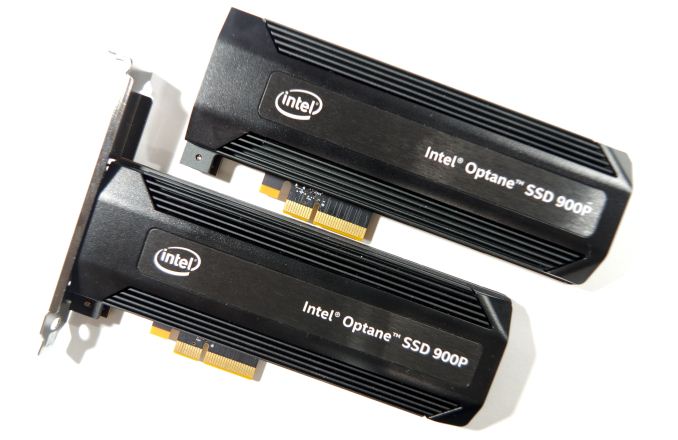
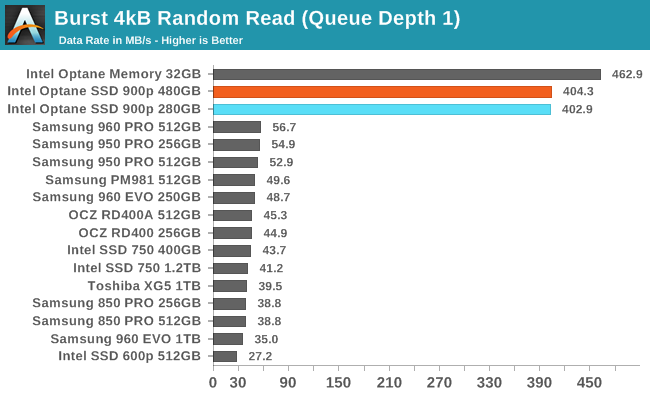
Without knowing anything else, it sounds like your issue is storage speed. I wrote a crypto trading bot a couple of years ago that stored an enormous amount of data from over a dozen exchanges (28,000 different currency pairs) and when the market made the occasional large move, with volume spiking on every coin my computer would lock up for 30 seconds to a minute at a time trying to catch up. I mean completely IO locked and that was with a Samsung 960 Pro NVMe drive. The solution I went with before switching to an in memory database was to replace the storage with an Intel Optane 900P drive. The read/write latency on Optane drives is orders of magnitude lower (better) than what you see on traditional solid state drives.

Longer term you probably need to reevaluate your system to find the real bottlenecks and see how you can reduce load and still get the same or better results but for a possible quick relatively inexpensive fix look into getting a PCI Express Optane drive like the 900P or the newer 905P. Here's a review link for the 900P: https://www.anandtech.com/show/12136/the-intel-optane-ssd-900p-480gb-review

Intel branding notwithstanding the drive works equally well on Intel or AMD systems so should you step up to something like the new 5950x AMD CPU the Optane drive will still be a great choice.

imgp8898_678x452.jpg

burst-rr.png
 
Last edited:
Price & Passmark

i9 = $580.00 ( Passmark - 22683 )
Xeon = $ 730.00 ( Passmark - 19288 )

My question is which has better performance when it comes to using tick charts ?


Passmark is no good tool to compare.

Maybe better watch here:https://cpu.userbenchmark.com/

I know that certain AMD's with very high passmark index get beaten by INTEL's with a much lower passmark index. ALL depends of what you are going to do with your computer.
 
Back
Top