Which is better for workstation i9 OR Xeon ?

I remember when the amd first gen threadripper came out and I built a system based on that and compared against my i9 7900x that the amd ran many of my backtest tasks resulting in more than twice the runtime. I could for the life of me not figure out what the issue was despite both running at similar frequencies. In the end I figured out that the avx vector units in the Intel CPU greatly boosted runtime performance of my compiled code. The compiler apparently took great advantage of the vector units. I never purchased amd again since. Even now, despite me liking the new Ryzen series I am highly suspicious of how they would perform for my very specific tasks. I still run my 10 core 7900x after all those years and am very happy with it.

Passmark is no good tool to compare.

Maybe better watch here:https://cpu.userbenchmark.com/

I know that certain AMD's with very high passmark index get beaten by INTEL's with a much lower passmark index. ALL depends of what you are going to do with your computer.
 
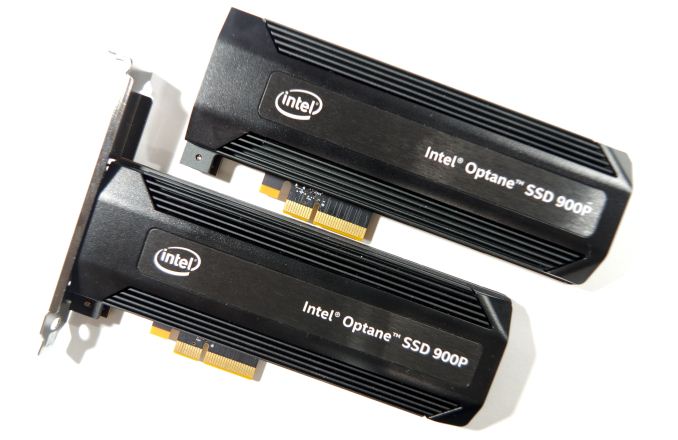
Without knowing anything else, it sounds like your issue is storage speed. I wrote a crypto trading bot a couple of years ago that stored an enormous amount of data from over a dozen exchanges (28,000 different currency pairs) and when the market made the occasional large move, with volume spiking on every coin my computer would lock up for 30 seconds to a minute at a time trying to catch up. I mean completely IO locked and that was with a Samsung 960 Pro NVMe drive. The solution I went with before switching to an in memory database was to replace the storage with an Intel Optane 900P drive. The read/write latency on Optane drives is orders of magnitude lower (better) than what you see on traditional solid state drives.

Longer term you probably need to reevaluate your system to find the real bottlenecks and see how you can reduce load and still get the same or better results but for a possible quick relatively inexpensive fix look into getting a PCI Express Optane drive like the 900P or the newer 905P. Here's a review link for the 900P: https://www.anandtech.com/show/12136/the-intel-optane-ssd-900p-480gb-review

Intel branding notwithstanding the drive works equally well on Intel or AMD systems so should you step up to something like the new 5950x AMD CPU the Optane drive will still be a great choice.

imgp8898_678x452.jpg

burst-rr.png

Tasty bit of Kit, when in the money YES PLEASE!!
 
Since you specified 8GB total disk space, that led me believe that you are doing a lot of disk work. Also, for 256GB NVME is way too small for this system. Remember that Windows will also use this drive for swapping memory, which will certainly happen if you buy only 16GB or RAM.
Yes, agree, you should buy 1T SSD, maybe two, skip the SATA HDD
 
Faster than SSD nvme??? I have the impression nvme is much faster than Optane.


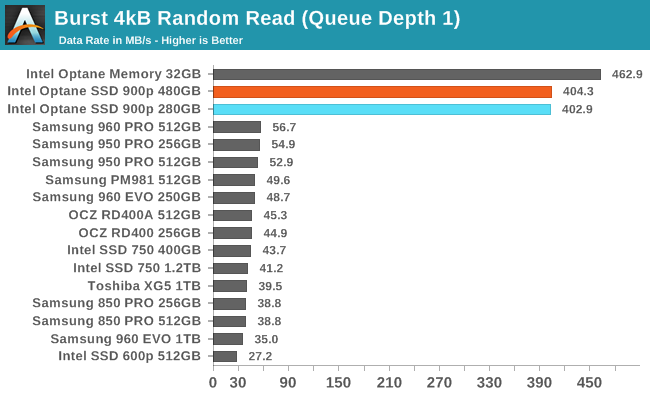
As Axon already posted, Optane drives have orders of magnitude faster 4k Read at QD=1 than any SSD, NVME or not.

However the reality is that low-intensity stuff on your PC (boot-up, loading apps, etc) is going to feel roughly the same between an Optane drive and an SSD.
 
As Axon already posted, Optane drives have orders of magnitude faster 4k Read at QD=1 than any SSD, NVME or not.

However the reality is that low-intensity stuff on your PC (boot-up, loading apps, etc) is going to feel roughly the same between an Optane drive and an SSD.


Finally found a more detailed explanation about what is faster and when. Because that matters. The difference in real world to me is not worth the high price. I would need a stopwatch to measure the difference, as it would probably not be noticable. Overkill for my trading.
Where I live Optane is up to 10 times more expensive than NVME m.2 for the same size of ssd.


https://ssd.userbenchmark.com/Compa...-900P-Optane-NVMe-PCIe-280GB/m182182vsm315555
 
Last edited:
Hi,
In July I put together Dell 5820 workstation with following specs & many of you helped me then. But due to some circumstances I did not buy it then.

Then i9 was not offered by Dell only Xeon, but now they do. So the question now is which is better ? ( With i9 they do not offer ECC memory )

Intel Core i9-10900X (3.7GHz, 4.7GHz Turbo, 10C, 19.25MB Cache, HT, (165W), DDR4-2666 Non-ECC)

OR

Intel Xeon W-2245 (8C, 3.9GHz 4.7GHz Turbo HT 16.5MB, (155W) DDR4-2933)

I use only tick charts. Do not play games.

The configuration I put together was as follows.

CPU :

Xeon W-2245

RAM :

16 GB ECC DDR4 2933

Grahics Cards :

AMD Radeon WX 3200, 4 GB ( 3 of them for 12 Monitors )

Boot Hard Drive :

M.2 256 GB PCIe NVMe Class 40 Solid State Drive

Extra Hard Drives :

2 x 1TB + 3 x 2 TB ( Total 5. All 3.5 inch Sata 7200 RPM )

Thanks

There are a lot of inputs that go into determining a good setup for your needs. Top of mind, they are:

1. How computer resource intensive is your trading system? Is it mainly CPU intensive, graphics card intensive, or both. Modern graphics cards are used for more than drawing pretty pictures. They can be used in AI and other intensive operations. Using ticks is very resource intensive. Some of the boys in that realm have $200,000 systems, not even getting into what the men have! Admittedly, these “Boys” are utilizing AI to a siginicant degree.

2. Do you see your trading system evolving to becoming even more complicated and computionally intensive?

3. What kind of sustained workload for the computer do you anticipate? Continuous high workloads can increase temperatures causing throttling issues and stressed hardware leading to less reliability over time along with the need for quicker component replacement.

4. How much are you willing to spend on a computer system in relation to your trading account size?

5. Do you or someone you know may be using your computer system for image editing, video editing, or cadcam?

6. How critical is reliability? Would a BSOD late on a Friday afternoon seriously bother you? If reliability is critical, go Xeon. If you decide on large amounts of ram, say 32 GB, consider expensive ECC.

7. What are your skills in programming and troublshooting computer issues? Cutting edge often has driver and support issues early on.

8. What is your expected equipment replacement cycle?

9. How many monitors do you anticipate using, at what resolution and color depth?

10. Are you comfortable building your own system?

11. What operating system will you be using? Windows 10 Home, the last I heard, forces you to accept updates other than security related. if so, this can create a system stability risk. If you are planning to use a higher end system, consider using a higher end OS. Some high end hardware setups are not fully utilized by base versions of an OS.

Consider the following user profiles, attributes, and rough recommendations:

If you want the best bang for buck, prefer the reliability of mature systems and do not need cutting edge, buy used. I have a very knowledgeable friend who has gotten some incredible deals on high end systems. Talk to a Dell or other major computer manufacturer representative or some used computer resellers for contacts and ideas.

If you want cutting edge performance, have few cost contraints, and have the technical proficiency or tolerance to handle some “Teething problems” often associated with a new system, but do not have the time to learn the intricacies of each cutting edge component and their compatibility issues - Buy a new system.

You want cutting edge performance, have some mechanical aptitude, have budget constraints, enjoys keeping your computer knowlege up to date - Build your own system.

The following links are to a couple high quality websites that provide detailed, professional level imformation regarding most aspects of computer systems:

https://www.cgdirector.com/

https://www.anandtech.com/

Warning: If you have geek potential and have not seen these websites before, say goodbye to your wife and kids before you visit these sites!

 
Did a search on “Financial Modeling” and found several good sites:

May be a little dated as far as cutting edge hardware, but concepts should still be useful.
https://www.nvidia.com/content/dam/...ng-the-right-workstationgraphicsimulation.pdf


The article below discusses benefits of ensuring data integrity, among other things.

Finance Calls for More Hard-Core Computation Than Meets the Eye

Finance is not the first space that comes to mind when thinking of a showcase for high-performance professional graphics hardware. That’s not to say financial markets don’t have unique and mission-critical graphics requirements — they do, in the form of large displays, low power consumption, and small form factors. But while reliability, power efficiency, and a high-resolution, multi-monitor setup in a tiny package are valuable and valid reasons to choose professional graphics hardware, as in software development, most financial applications haven’t traditionally had a compelling need for a higher-performance GPU.

Even with limited visualization demands, workstations are a compelling buy for finance users, to tackle tasks whose performance and precision can have a dramatic effect on the bottom line of both a financial firm and its clients; examples include calculating pricing and risk models for options and other derivatives.

Because these non-trivial tasks have huge potential implications for profit and loss, competing firms are pushed to concoct their own that-much-more-advanced formulas in the aim of gaining an edge on the trading floor. As a result, the models they employ are complex, math-intensive and exhaustive, incorporating a range of methods including Monte Carlo simulations, stochastic modeling, and finite element analysis (similar in approach to the FEA employed in CAD applications). Each can require billions or trillions of compute cycles, multiplied by as many iterations as necessary to converge on a solution, or simply run for as long as time and available CPUs will allow. And perhaps more so than in any other industry, getting the information even fractions of a second earlier can make a big difference in the bottom line. So not only are a multitude of CPU cores and even second CPU sockets valued, but increasingly a high-performance GPU is as well — less for visual processing and more for GPU computation of algorithms that lend themselves well to massively parallel execution.

Moreover, all that low-latency throughput has to be performed reliably and with unquestioned precision. Bit errors are rare, but they can and do happen. Mess up one pixel, one scanline of a triangle, or even an entire frame in a game, and it’s quickly forgotten, if detected at all. But other professional applications don’t share the same tolerance for error. The impact of bad data in medical applications, for example, goes without saying. And while it’s not life or death in finance, the impact of bit errors can be quite severe: A permanent error propagating its way through a real-time pricing model could devastate a financial institution or trading exchange. No surprise then that error-correcting code (ECC), found only in workstation-class CPUs and GPUs, makes a natural and valuable candidate to drive mission-critical applications for financials, as well as critical medical, scientific, and government operations.
https://www.cadalyst.com/design-rel...stations/who-using-workstations-and-why-71846


The following article is a brief interview of Erik Vynckier, CIO of AllianceBernstein on financial modeling. An excerpt from the article:

Can you describe the kinds of work your company is doing with high performance computing?

Vynckier: At AllianceBernstein, the agenda for high performance computing and big data in finance centers is about making best use of time-series data from the capital markets, such as traded prices and volumes and order book data, as well as other economic data for optimally investing client money. Smart beta – distilling sound quantitative strategies from economic and market data – requires searching, backtesting and fundamentally understanding investment trends, such as the well-documented systematic biases of carry, value, momentum and low volatility anomalies.

On top of identifying the investment strategies that promise success, estimating and controlling the implementation costs of these trade-intensive strategies is crucial. Risk management of quantitative strategies requires not just back-testing, as the future may not be apparent from the past, but also implementing effective diversification across strategies. Managing volatility down to an acceptable level is also important and is accomplished through volatility-targeting and tail-risk hedging. Each step of the investment process can benefit from big data techniques.
https://www.nextplatform.com/2015/04/21/an-insiders-view-of-financial-modeling-on-hpc-systems/
 
Back
Top