
i never said like on an old tube tv, you did. Try true video 4k test on full screen 40"+ and see lines refresh one at a time. make sure your resolution on computer is set 3840x2160 and give it another go.

You are using an out of date browser. It may not display this or other websites correctly.
You should upgrade or use an alternative browser.
You should upgrade or use an alternative browser.
Why buy computer monitors? Why not just buy a flat screen TV? Much cheaper
- Thread starter achilles28
- Start date
i never said flicker like on an old tube tv, you did. I didn't know flicker is defined only for tube tv. Try true video 4k test on full screen 40"+ and see lines refresh one at a time. make sure your resolution on computer is set 3840x2160 and give it another go. Are you using seiki u-vision cable, if not make sure you're really getting 4k, that 4x 1080P screens. BTW what graphics card are you using?This is not true in my experience. There is no flicker on a 4k monitor at 30 hz like there is on an old tube. 60 hz is the new norm for inexpensive TV's. A cheap graphics card will run a 4k monitor at 60 hz. A new i7 will run a 4k monitor at 30 hz with no additional graphics card. I run both my monitors at 30 hz. One because of an old graphics card, the other with a newish i7. I would never even think of using anything else again.
Both of my monitors are Seiki but if I were buying one today I would look at Spector and Hisense from Walmart.
Remember, if your monitor does not have a monitor mode in the setup, you will need to go through the menus and adjust the setup to get rid of the horrible lag when running in TV mode.
flick·er1 ˈflikər/
verb. / noun.
- (of light or a source of light) shine unsteadily; vary rapidly in brightness.
"the interior lights flickered and came on"
synonyms: glimmer, glint, flare, dance, gutter; More - make small, quick movements; flutter rapidly.
"her eyelids flickered"
synonyms: flutter, quiver, tremble, shiver, shudder, spasm, jerk, twitch
"his eyelids flickered"
- an unsteady movement of a flame or light that causes rapid variations in brightness. "the flicker of a candle flame caught our eyes"
- a tiny movement. "then a flicker of movement caught his eye"
Last edited:

It's Mr Gekko. His monitors were 20" LCD, LED was available but really expensive. Like his Herman Miller chair and Brioni suit ...
View attachment 168210
In '87 he had this:
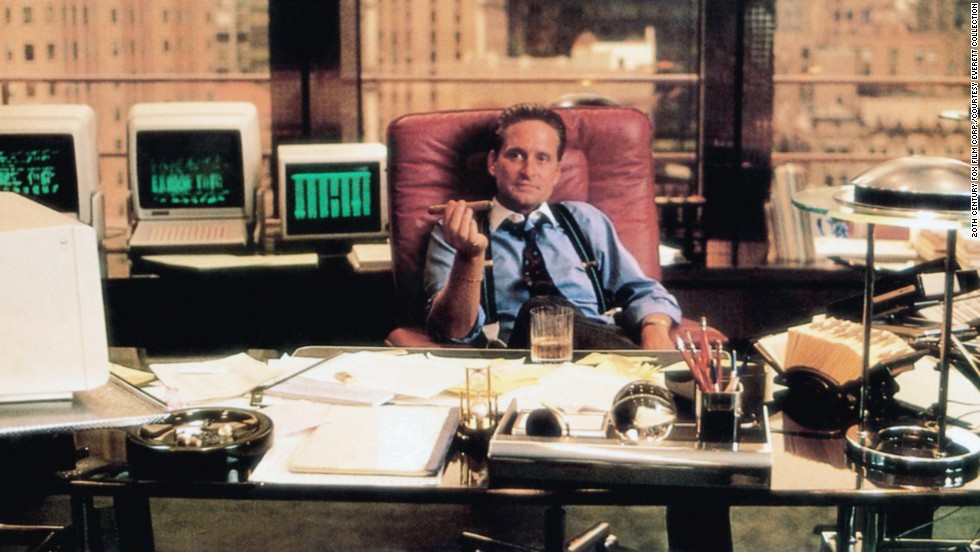
Randolph and Randolph only had one monitor. I wonder if it's a 3270 dumb terminal connected to a mainframe.In '87 he had this:
Last edited:

Randolph and Randolph only had one monitor. I wonder if it's a 3270 dumb terminal connected to a mainframe.
View attachment 168436
I agree, Simple is best.
You only need one monitor for trading...trading is not a science or an engineering rocket monitoring spaceship thing.
You just need one basic, small screen to place an order and monitor the position.


Alot of people make trading out to be so much more complicated or technical than the process really is.
Trading Places is a great trading movie, in my opinion. -- they demonstrate the process out simply and understandably. Based on human emotions and wants/desires and common sense.
Alot of other trading movies make their job seem so smart and stuffy.
Last edited:
You just need one basic, small screen to place an order and monitor the position.
.
Preferably with green fonts and lots of beeps?


I agree, Simple is best.
You only need one monitor for trading...trading is not a science or an engineering rocket monitoring spaceship thing.
You just need one basic, small screen to place an order and monitor the position.
Alot of people make trading out to be so much more complicated or technical than the process really is.
Trading Places is a great trading movie, in my opinion. -- they demonstrate the process out simply and understandably. Based on human emotions and wants/desires and common sense.
Alot of other trading movies make their job seem so smart and stuffy.
While I have one monitor now, most of my trading life I've had two. One is clearly not enough. I don't monitor just one position at a time. I'd have an algo execution view, executions, maybe a chart or two, API console, TWS orders page - how to you easily fit all that onto one screen? If it's 40" inches then sure but not when the screen is below 30".
While I have one monitor now, most of my trading life I've had two. One is clearly not enough. I don't monitor just one position at a time. I'd have an algo execution view, executions, maybe a chart or two, API console, TWS orders page - how to you easily fit all that onto one screen? If it's 40" inches then sure but not when the screen is below 30".
I just place one big order during the day, or two...I play both sides

So for me, I have very basic tech needs;

The ending of the movie Trading Places kind of sums up my trading style.
Last edited:
Great trading movieI just place one big order during the day, or two...I play both sides
So for me, I have very basic tech needs;
The ending of the movie Trading Places kind of sums up my trading style.


Trading Places is a great trading movie, in my opinion. -- they demonstrate the process out simply and understandably.
Other than leaving out the part about OJ having what, a $0.15 daily limit? Guess it wouldn't make for much of a movie if the price changed 15 cents and everybody called it quits for the day and went home.
Otherwise, agree about it being a good trading movie.
"Whether the price goes up or down, we at Duke and Duke still make the commission. Understand, Valentine"?
"Yeah, y'all are a bunch of bookies".
LOL!
(And if you happen to catch the right version, you'll get to see Jamie's world-class rack!)
Last edited: