Ultra-thin Monitors

I have Dell Ultrasharps in one location and am happy. Make sure to really confirm though: what is sometimes listed as matte, may not be (or may be some type of hybrid matte, not a true matte).

I also have a couple Acer B246WL which are slim bezel and matte and am happy with those as well.

If only I could get some more of my old LG 23EA64's. I'm down to one...when moving offices last year, one was ruined. That was a tough pill to swallow.

The HPs posted earlier look very good (that combined with having seen HP matte in person before). Guessing they weren't yet out last time we were in the market (about 18mos ago). They don't look like natively vesa-compatible though. Even if that's a problem, I think there are some aftermarket adapters - that might hurt your price savings though.


As for "matte finish", only matters if you have "direct light glare". Personally, I go for the smooth finished ones, then angle them away from glare. (My favorite monitor has an actual smooth glass screen, but no glare because of how positioned.)

In my experience, I've found that glossy screens can be a real pain even when the light source isn't 'direct'. So I have to disagree, but I would certainly concede that it's highly personal, and will also depend on how bright is the room that you're in.
 
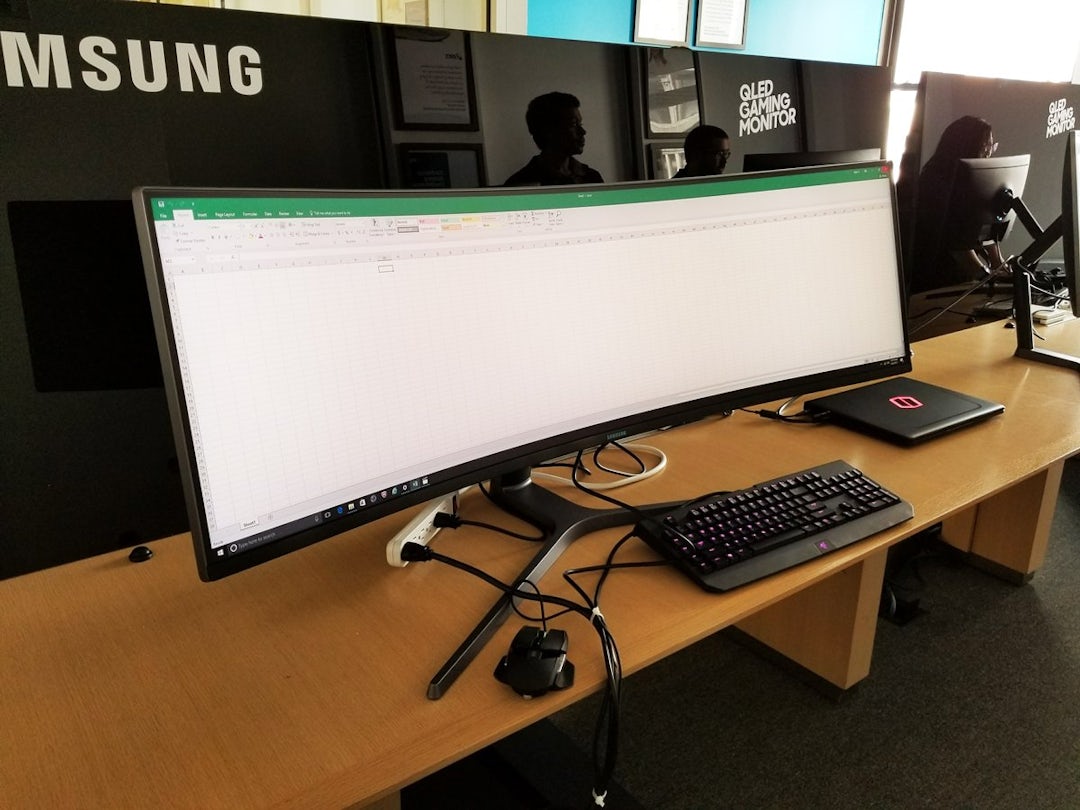
1497378774849behold-the-49-inch-chg90-super-ultrawide-gaming-monitor-from-samsung-samsungs-marketing-photo-simply-doesnt-do-justice-to-the-chg90s-incredible-super-ultra-width-so-here-it-is-displaying-an-excel-spreadsheet-to-help-put-it-into-perspect_1.jpg

That's a ridiculous-sized computer monitor...I mean you're only a foot or two away from it,

I've been only using a 14" laptop for years and years...I must imagine my eyes and neck muscles must get a true workout with that, o_O

But I still want it. for porn -- and maybe computer gaming, even though I don't really play games anymore.

3840 X 1080 pixels resolution is kind of low, or just average...for that size monitor though,
There are alot of other computer monitors on the market with much denser resolutions.
 
Last edited:
I am considering getting this

Dell Announces Its First Multi-Client Monitor, Designed for Financial Traders and Software Developers

  • Four independent clients in a single screen without bezels hindering view
  • Ultra HD 4K single or multiple input FHD resolution screens with a matte finish to reduce glare and strain on eyes
http://www.dell.com/learn/us/en/usc...016-05-17-dell-43-multi-client-monitor-p4317q

Edit: It is $899 US, don't know if that is out of budget
http://www.dell.com/en-us/work/shop...17q/apd/210-ahsq/monitors-monitor-accessories

P4317Q.jpg
 
Last edited:
I am considering getting this

Dell Announces Its First Multi-Client Monitor, Designed for Financial Traders and Software Developers

  • Four independent clients in a single screen without bezels hindering view
  • Ultra HD 4K single or multiple input FHD resolution screens with a matte finish to reduce glare and strain on eyes
http://www.dell.com/learn/us/en/usc...016-05-17-dell-43-multi-client-monitor-p4317q

Edit: It is $899 US, don't know if that is out of budget
http://www.dell.com/en-us/work/shop...17q/apd/210-ahsq/monitors-monitor-accessories

P4317Q.jpg

I would say forget it. This is pricier than 4 ultrasharp 24" monitors, and for that extra expense you are setting yourself up for a single point of failure. If 1 monitor fails in a set of 4, you still have the other three while the broken one is repaired/replaced. If this one fails in any way, you lose all screens at once to have it repaired/replaced.
 
Hey @Scataphagos I think I pretty much can agree with you on most of this; especially with losing attention to most distractions once getting engrossed with charts. However, the issue lies on my side, where I am handicapped by my OCD tendencies and I don't like anything being a distraction when I am trading and so I make sure I try and have all angles covered.

Your solution to reducing glare is a pretty simple one should it all align. I am sure I can use your solution with one monitor, but may become an issue with multiple monitors, if I want them all perfectly aligned. I sit right by a large double window and also have another station with 4 monitors that will sit on the opposite wall (my back facing away from it) and feel that those 2 factors may come in the way.

I just got back from Best Buy and really liked these monitors for everything (but the price), especially the thinness of it. Your thoughts?.

Thanks for the tips @Scataphagos ; appreciate it!.

Light in the room whether from bulbs, through windows, or even reflected within the room... along with monitor placement and your viewing angle will determine whether or not you can eliminate glare. If you can, great. If not then a matte finish might be your choice. (I use multi-monitor with no glare at all. I also have a couple of old plasma TVs with glass screens... again, no glare. But I have one with a matte finish which from some angles almost can't be viewed at all until the sun goes down. The matte doesn't help enough. That TV is also old and comparatively heavy... about 85 pounds... and is in an awkward "built-around" space. Otherwise, I'd replace the mount with an articulating one where I could perhaps angle the glare away. When the TV is eventually replaced it will get a new mount.)
 
Last edited:
I would say forget it. This is pricier than 4 ultrasharp 24" monitors, and for that extra expense you are setting yourself up for a single point of failure. If 1 monitor fails in a set of 4, you still have the other three while the broken one is repaired/replaced. If this one fails in any way, you lose all screens at once to have it repaired/replaced.

It is the same issue if you only have 1 computer, 1 power source, 1 ISP connection....

Everyone should have a backup already. I keep a laptop always plugged in and fully charged in case I lose power to my house that has an 8 hour battery. I also have the ability to tether my laptop to my phone over LTE 4 in case my ISP goes offline. I also have an account with Amazon AWS so I can spin up a windows machine and connect to it from anywhere I can accesses a browser.
 
I am writing this response on a "4k" 3840x2160@60Hz (HDMI 2.0) 50" Hisense 50cu6000 Smart TV that I got from Target last Black Friday for about $250. Before the 4k@60Hz 42" Silo display that this replaced and before the 4k@30Hz 40" Seiki that that replaced, I used a two display system, which I think was 1600x1200 + 1920x1080. I think the 50" 4k screen has been a substantial improvement over all of these, although I agree with Scataphagos that the bezels between the display I used back then were not the annoyance I had originally expected (except when I tried to view media using both screens).

Another possible plus for the 4k options is that it seems that, judging just from my latest Hisense display, it seems that image quality for watching movies has improved dramatically for "el cheapo", "no name" 4k displays. The two earlier 4k televisions had horrible image quality for playing movies, but my Hisense has quality that, as far as I can tell, is equal to the best that I see in video showrooms, although I always set "smooth motion" and "noise reduction" to their maximum levels when I watch movies and turn those settings off when I am using any part of the display to manipulate text (because the maximum setting of "smooth motion" causes the image processing to make other areas of the screen move sometimes when it detects motion in one part of the image.

Using less space for mounts or stands, using one less video cable, being able to use all those pixels to watch a single video when you're not using the display for trading, and perhaps getting slightly better image quality from some stream services due to the stream service implemented in the TV presumably not being limited to HDMI color depths might be substantial advantages if you think you'd have any opportunity at all to use the display for watching video content when you're not using it as a computer monitor.

You might want to do some web searches for cheap 4k TV's. For the next few months, you probably still won't find a deal better in every dimension than what I was lucky enough to find, but deals that are close are offered every now and then and tracked on various web pages, such as https://dealnews.com/c159/Electronics/TVs/f1409/4-K/ .

I must add one warning, however. In reading many reviews of people buying refurbished displays, I have read reports of sellers, including at least one selling through Walmart, if I recall correctly, apparently shipping obviously defective displays, leading at least one review author to speculate that some of these shops are just shipping out their returns as "refurbished" without determining that they have fixed the problem that caused the original return.

@toonerdy I would have researched that option, but I don't watch enough TV to warrant getting a 4K. I also keep my trading monitors to solely trading, with an eventual YouTube here and there.
 
I also have a couple Acer B246WL which are slim bezel and matte and am happy with those as well.

If only I could get some more of my old LG 23EA64's. I'm down to one...when moving offices last year, one was ruined. That was a tough pill to swallow.

A couple of very nice options as a substitute for what I'm looking at. Ty @oversea
 
Back
Top