
For some reason, all my order presets have lost their custom precautionary size limits (overriding the system default). The thing I cannot even re-create them bc in the Preset edit dialog box (all possible fields set to visible), the Precautionary settings section is no longer in existence.
This is what should show up (per the IBKR.com help page):
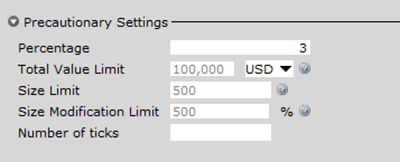
But it is not, and I am getting popups every time I submit an order > 500 shares. Been using TWS for 10 years; first time I have seen this. Anyone else in same boat? Is there a workaround to edit the system limits? Build 972.1v.
This is what should show up (per the IBKR.com help page):
But it is not, and I am getting popups every time I submit an order > 500 shares. Been using TWS for 10 years; first time I have seen this. Anyone else in same boat? Is there a workaround to edit the system limits? Build 972.1v.