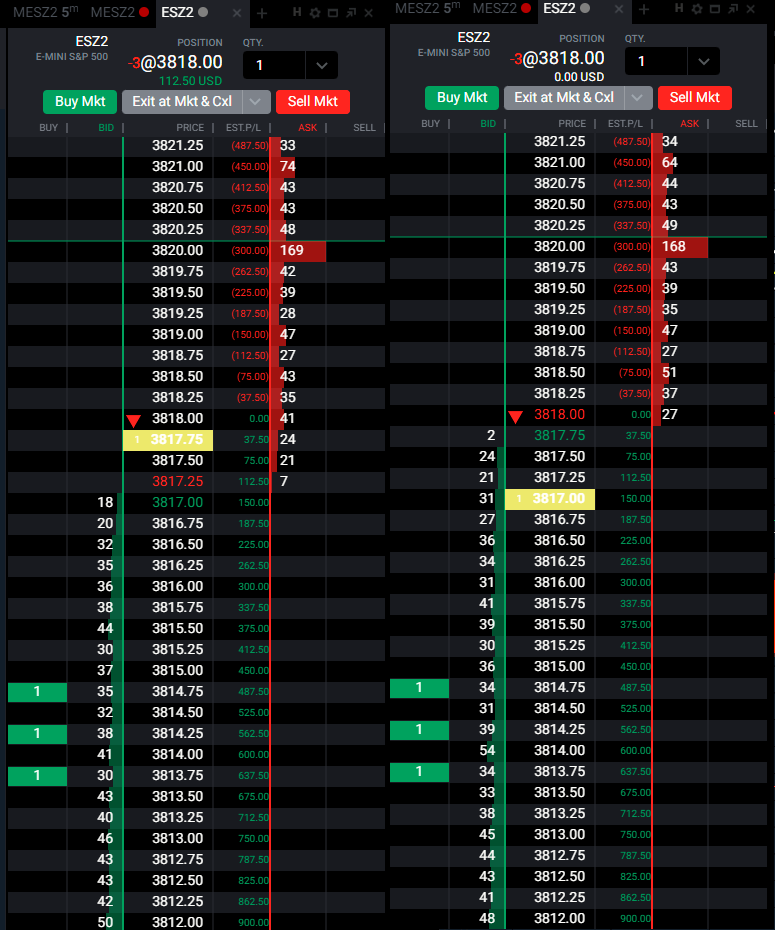
Tradovate DOM is lagging

I don't use Tradovate.

I have lagging issues from my trading platforms/doms and charting s/w every
few weeks/months.

solution?
rent a trading desk from a trading house/brokerage firm and
use a powerful platform like TT.
That will cost > $1.5k/mth.
as far as I know, there is no solution for lagging charting s/w.

Well, CQG Q Trader will perform pretty well with NO lags and it's very fast
Price execution is better than CQG Web and very close to TT.
The problem of this platform is charting.
Only 1 chart at time for 1 symbol, so you need of another charting software
AMP offers CQG Q trader for free, but if you ask them a second set of user&psw you will pay 10$ month + plus exchange fees having acces to another free platform like Quantower or Multicharts
If you trade only 1 exchange like CME you will pay only few bucks for 2 platform, 1 for execution (CQG Q trader DOM) and another for charting
In this way you have also a real time back up

Bracket orders are server side with CQG Q Trader, and this is important
It seems to me that also Tradovate has this feature, not sure with Ninja Trader Continuum

If you place orders with CQG WEB Api using other softwares like Quantower, Multicharts, Sierra Chart, Motivewave, bracket orders are local machine, no server side. So if your trading style is based on Trailing stops you have to consider this difference
 
Last edited:
Well, CQG Q Trader will perform pretty well with NO lags and it's very fast
Price execution is better than CQG Web and very close to TT.
The problem of this platform is charting.
Only 1 chart at time for 1 symbol, so you need of another charting software
AMP offers CQG Q trader for free, but if you ask them a second set of user&psw you will pay 10$ month + plus exchange fees having acces to another free platform like Quantower or Multicharts
If you trade only 1 exchange like CME you will pay only few bucks for 2 platform, 1 for execution (CQG Q trader DOM) and another for charting
In this way you have also a real time back up

Bracket orders are server side with CQG Q Trader, and this is important
It seems to me that also Tradovate has this feature, not sure with Ninja Trader Continuum

If you place orders with CQG WEB Api using other softwares like Quantower, Multicharts, Sierra Chart, Motivewave, bracket orders are local machine, no server side. So if your trading style is based on Trailing stops you have to consider this difference

Right CQG has charting limitation.


I compared Esignal charting s/w
(using TCP/IP protocol) vs a proprietary s/w (using UCP/IP protocol).
during the super hot / super heavy traffic situation.

the difference is like the difference between Porshe and Lada cars.
Esignal behaved like the Lada car.

anyway, I am still exploring a better charting s/w.
 
Last edited:
It's really unbelievable that I bring this to their attention with no reply!!

It seems that it was only on my side...

I have just found a video that shows this huge issue


I watched carefully the video.
I don't think that is a real lag. If you notice the last price, it has some freezes, but not the bid/ask columns, that are updated correctly.
So this issue is related to the Last price in my opinion
That being said, I think Tradovate needs to fix it
 
Last edited:
The SUPPORT forum is completely abandoned now

No reply at all

Nobody is reading what a customer is writing

Unbelievable, how things became bad since Ninja acquired Tradovate
 
I used chat and got a response hours later. I was told they haven't been seeing my issue and it is probably on my side. Also told me to try the desktop version. I had been using the browser version, but have set up the desktop app. At this point I haven't seen the problem, but volume is nothing today. I'll see how it goes this week on the desktop app, and hopefully we will see a few up volume days to get a real test.
 
I used chat and got a response hours later. I was told they haven't been seeing my issue and it is probably on my side. Also told me to try the desktop version. I had been using the browser version, but have set up the desktop app. At this point I haven't seen the problem, but volume is nothing today. I'll see how it goes this week on the desktop app, and hopefully we will see a few up volume days to get a real test.

I use the Desktop version, and the issue is clearly visible
I have just tried the Web version and there was no difference
Both are lagging

But for Tradovate all is fine
Well just watch a real time trading channel on you tube "Trades by Matt" that is live
THE DOM IS LAGGING

So what?? Why are they lying?
 
Ok, first trade this morning I saw it. My fill to close hit and filled but the DOM didn't show it going to that number for a second (maybe milliseconds) later. The order did fill which is most important so data is coming through but platform apparently not moving as fast as data for display purposes.
I experienced this with IB, but was much worse in terms of the delay between fill and price actually showing on DOM.
 
Ok, first trade this morning I saw it. My fill to close hit and filled but the DOM didn't show it going to that number for a second (maybe milliseconds) later. The order did fill which is most important so data is coming through but platform apparently not moving as fast as data for display purposes.
I experienced this with IB, but was much worse in terms of the delay between fill and price actually showing on DOM.

Please try this:

Add to you indicators >NOM Colored Pice Line (be sure that SHOW VALUE is flagged)
Then compare 2 charts with the same symbol and time bar

Chart 1 add Last Trade Price (under >Settings>Price Levels>Last Trade Price)
Chart 2 add NOM Colored Price Line

Just Compare them

You will see how the NOM Price Line IS EXTREMELY MORE ACCURATE (It never lags)
So if a simple indicator developed by a user is more precise than the original made by Tradovate, well there is something strange

The Last Trade Price by Tradovate follows exactly the Last price in the DOM and it lags hundreds of time during the day

This is unacceptable, and it's unacceptable that they continue to say that's it is on my side

Test 2:

Link the chart with the NOM Price Line to the DOM and under DOM settings flag on Show Chart Indicator. You will see the word NOM that appears on the DOM
Just watch carefully how the LAST PRICE lags compared to the NOM word (indicator)
 
Last edited:
What is this??
Not a lag?

:mad:

TRADOVATE-LAST-PRICE-LAGS.png
 

Attachments

  • TRADOVATE LAST PRICE LAGS.png
    TRADOVATE LAST PRICE LAGS.png
    114 KB · Views: 5
Back
Top