More info about Blocks:
Loading and unloading in Blocks is basically single threaded. best it can do is push one processor to 100%.
All of the calculations are definitely multi threaded, that is to say a calculation uses it's own thread, so once it is up and running it can utilize both cores ( or many).
Most operations that involve opening and closing windows etc. are bound to one processor.
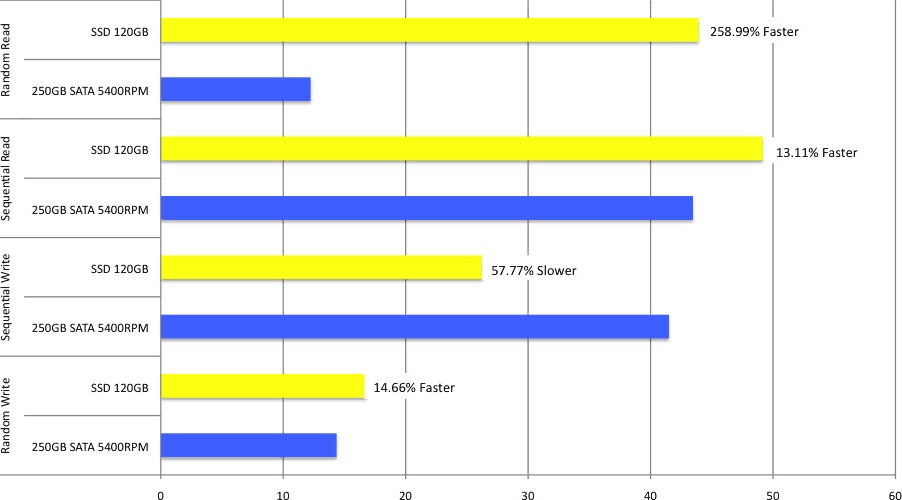
HD speed - The faster you can read/write your data, the faster Blocks/StockFinder will perform.
Ram - 4 gigs is dirt cheap and about the best overall performance gain you can get for your entire computer.
Bus Speed - This one is related to HD speed. The faster your computer can communicate across the bus, the faster the program will be. I would suggest an 800 bus or better.
CPU Speed - The faster the core speed, the faster your calculations.
CPU Cores - The more cores your computer has the more calculations it can perform at the same time.
The number one improvement you can probably do to any system you build is get the fastest hard drive possible. Blocks is mostly IO bound when it comes to processing and calculating data.
If you have a complex RealCode calculation then increasing the speed (not cores) of your processor will imrpove the performance of the individual calculation.
If you're running multiple scans in RealTime and/or many many indicators on one or more charts then more cores should improve your performance.
As for your internet connection, it should not really be a limiting factor in performance unless you have a poor connection that drops many packets. The data is streamlined to be send on a small pipe. If you're on a fiber link right into the backbone, you should not be having any delivery problems, but the speed of your hard drive might be degrading your performance.
As always, keep your hard drive defragmented, it will improve your overall system performance. If you're really looking to squeeze every last ounce of speed out of your system, you can install the Blocks data on a dedicated hard drive.
A raid 0 striped drive would really increase IO (disk) performance. Raid 1 would increase read performance but slow down write performance as it's downloading the newer data.
Nobody really mentioned video card recommendations. I recommend that the user buy the fastest graphics card with the most RAM possible. Direct X is not an issue with our software, but Direct X 10 compatibility will be important for graphics intensive applications in other areas.
Multiple arrays of RAID 0, one for your OS, one for your swap file, and one for your data and program files, will be especially fast.
I've seen a peak memory usage of 800MB from the Blocks Data Manager during a period of heavy updating. peak RAM usage I've seen in Blocks was 1.3 GB.
My recommendation for hardware is based on these facts:
Fastest Direct x 10 video card with the most RAM possible
Fastest 64 bit CPU possible
RAID 0
Most RAM possible
increasing RAM normally has the greatest bang for the buck, but this is only true if you are actually running out of physical RAM and using the Hard Drive as Virtual Memory instead.
The often overlooked performance is the Hard Drive. It is the slowest item in a computer period. This does not mean to go buy a really large drive, but a fast one. Drives of higher rpm, with better caching, and definately not external usb or firewire are preferred for blocks data. The exception to this is scaning daily price data with the option to load prices into memory. In this case if you have ample memory to load prices into history and have checked the option to do so, the hard drive does not come into play, it will be more of a cpu issue. If you are scanning on time frames below daily, zacks, or hemscott data, the hard drive is probably the biggest bottleneck.