Prediction Based Trading

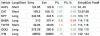
Table as attached
 

Attachments

  • Screen Shot 2020-10-28 at 8.58.06 AM.png
    Screen Shot 2020-10-28 at 8.58.06 AM.png
    86.3 KB · Views: 28
Chart as attached. Do you know how to make the chart appear in the post as an image without needing to be clicked on? Like in post 125?

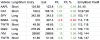
As an aside, I closed the twtr trade relatively quickly because post-earnings usually suffers from IV crush- to keep holding would potentially cause a loss even if price was well under the exit. As it was, I got lucky on that large candle. Also, I missed the current low on the indices- It was a simultaneous 2+ hit which typically generate good trades. Oh well.
 

Attachments

  • Screen Shot 2020-10-29 at 7.13.55 AM.png
    Screen Shot 2020-10-29 at 7.13.55 AM.png
    95.6 KB · Views: 151
Do you know how to make the chart appear in the post as an image without needing to be clicked on? Like in post 125?
Try using 'inline' if you are given that option after you upload the image.

Or, you can do it the way you've been doing it.
Then, after you make the post, click the image to open it in another browser tab.
Then, right click copy the image onto the clipboard.
Then, edit the original post, and paste the image into the message.
Then, delete the attached file.
See below.

The above assumes you are using windows os.

screen-shot-2020-10-29-at-7-13-55-am-png.242715
 
Back
Top