
Hi,
Just bought a new Dell 3660 workstation with Following specs:
Intel i-7 12700 CPU
Windows-11 Pro.
Two NVIDIA T-600 Cards each with 4miniDP ports to run 8 Monitors ( 24 inch each 1920x1200 resolution)
16GB DDR5
Three 512GB NVME
Three 4TB Sata 5400 RPM.
Since there are Large 8 Monitors, I have to sit at least 4 to 6 feet away so I can see all 8 monitors & be able to read text from them. But there are two major problems & I don't know the reasons. I am new to Win-11.
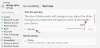
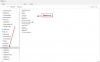
(1) In windows explorer file & folder names are too small to read so I increased the text size to 225% in Windows settings ( Image # 1 ) to be able to read. But then the file & folder names get clipped as in attachment #2. So I had reduced it to 20% but then I can not read anything because font size is too small. I also tried to increase scale size but that does not help either.
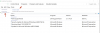
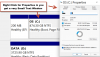
The problem persists with text size in other windows & right click menu even after increasing it to 225% as in images #3, 4, 5 shown here.
I have been using Win-7 with 12 Monitors but never had this problem.
(2) Out of 8 Monitors one monitor resolution is such that everything is too large like Text, images etc. If I connect that monitor to my older system there is no problem, so nothing wrong with monitor.
(3) In two monitors I have to forcefully push the mouse to go to another monitor.
Those using Windows -11 might have answers to some of the problems & some graphics card experts too might have a clue.
I know Scat must be smiling & just might have a solution.
Please help.
Thank You
Just bought a new Dell 3660 workstation with Following specs:
Intel i-7 12700 CPU
Windows-11 Pro.
Two NVIDIA T-600 Cards each with 4miniDP ports to run 8 Monitors ( 24 inch each 1920x1200 resolution)
16GB DDR5
Three 512GB NVME
Three 4TB Sata 5400 RPM.
Since there are Large 8 Monitors, I have to sit at least 4 to 6 feet away so I can see all 8 monitors & be able to read text from them. But there are two major problems & I don't know the reasons. I am new to Win-11.
(1) In windows explorer file & folder names are too small to read so I increased the text size to 225% in Windows settings ( Image # 1 ) to be able to read. But then the file & folder names get clipped as in attachment #2. So I had reduced it to 20% but then I can not read anything because font size is too small. I also tried to increase scale size but that does not help either.
The problem persists with text size in other windows & right click menu even after increasing it to 225% as in images #3, 4, 5 shown here.
I have been using Win-7 with 12 Monitors but never had this problem.
(2) Out of 8 Monitors one monitor resolution is such that everything is too large like Text, images etc. If I connect that monitor to my older system there is no problem, so nothing wrong with monitor.
(3) In two monitors I have to forcefully push the mouse to go to another monitor.
Those using Windows -11 might have answers to some of the problems & some graphics card experts too might have a clue.
I know Scat must be smiling & just might have a solution.
Please help.
Thank You


 That would be an absolutely deal-breaker for me.