It shouldn't matter whether or not you are writing data to the HDD. The HDD should always be keeping SMART stats as long as it is powered and spinning, even if the drive is not mounted by the O/S or the data cable is not attached.Tuxan and Cypherdude,
Really appreciate your expert help.
When I posted the thread I had used the HDD to just get the test result & had not written any data on it & so is that the reason Crystal disk not showing any power on hours ?
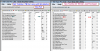
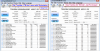
I just wrote about 1 TB of data & have put the test results here. I don't know what spin up time is & why is it such a huge number when threshold should be only 1.
Please advice because I need 2 more drives like this & if it is safe to order.
I don't understand the logic behind putting such a delicate & expensive hardware in a tinfoil ( Anti static ) & how many hands did it change & hopefully no one had dropped it.
Thank You
Your drive is keeping stats. Your HDD now has 31 Power-On Hours according to HD Tune Pro. CrystalDiskInfo says 1F which is hexadecimal and is 31 in decimal. You can use the Windows Calculator in "Programmer" mode to translate the numbers or just use an Internet search. I used Startpage Internet search to translate and later tried Windows Calculator. Why CrystalDiskInfo doesn't just use decimal I don't know.
Your Spin Up Time in HD Tune Pro is 11896 which is milliseconds or 11.896 seconds. In CrystalDiskInfo it's 2E78 which is hexadecimal or 11896 decimal. This seems a bit slow but as long as you're satisfied, it's OK. As a comparison, the Spin Up Time for my WD Black 7200 RPM HDD is 4266 milliseconds or 4.3 seconds. It could be Toshiba counts Spin Up Time in a different way.
Your HD Tune Pro 5.60 Error Scan for the entire drive seems to be OK. As long as your drive doesn't make any strange noises and the SMART stats are OK, you should be OK. In order to get any SMART stat reading translated into English in HD Tune Pro 5.60, which I am running right now, you need to click on the stat and read what it means on the bottom of the SMART list under "Description."
For the SMART stats, you have a "Current" number, what I call the Index. The "Threshold" is the lowest acceptable SMART Index you can have without the drive throwing an error. The Index is not the actual Data or Raw Value.
Again, personally I prefer to buy a Retail-Boxed hard drive, preferably in person, because HDD's are so delicate. Unfortunately, it has become the norm to buy HDD's in only anti-static bags. It's up to you what to buy. BTW, there is a controversy today regarding manufacturer warranties. I have seen some hardware news videos saying manufacturers are reneging, or welshing, on their warranties. The FTC has become involved. I am not saying anything about any manufacturer. However, the controversy is out there. Call Toshiba and make sure you are actually covered and for how long. Sometimes you must purchase hardware from an "Authorized" retailer to be covered by a warranty.
Last edited: