Something Ive never quite figured out but need to figure out as Im trying to configure some limit order hotkeys for trading pre-post market.
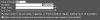
What is the difference between fill outside rth vs allow pre-open? Doesn't "fill outside rth" also include the pre-market? The premarket is outside regular trading hours so why is there a seperate "allow pre-open" option?
When creating a hotkey it doesn't allow you to designate the either of these options. So you need to configure your order presets and you can only check one box or the other for fill outside rth vs allow pre-open.
Any clarification/help would be great. Thanks.
What is the difference between fill outside rth vs allow pre-open? Doesn't "fill outside rth" also include the pre-market? The premarket is outside regular trading hours so why is there a seperate "allow pre-open" option?
When creating a hotkey it doesn't allow you to designate the either of these options. So you need to configure your order presets and you can only check one box or the other for fill outside rth vs allow pre-open.
Any clarification/help would be great. Thanks.