Excel formula question.

VBA to me is never an option. If you need VBA then it is way easier to install conda and learn to use pandas in a jupyter notebook. Pandas came about from Wes McKinney working with trading data at AQR so it pretty much does anything you could ever want to do with trading data.

I know everyone is different but vba is my goto for virtually everything. There’s almost nothing I can’t build in an hour or two.
 
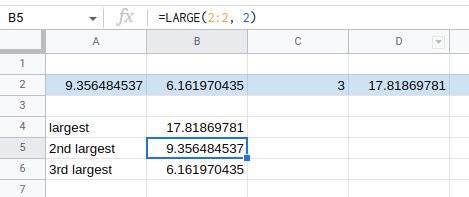
=LARGE() and =SMALL() will give the nth largest/smallest in a series
large.png


You just need to have nothing else in the row or column that is basically representing the array/series. Then the only thing you would have to figure out is how you are appending values to that row or column.

I would figure out one symbol and then make a new sheet in the workbook for each symbol. Then make a sheet that is basically a dashboard for all the sheets for however you want to visualize the data.

VBA to me is never an option. If you need VBA then it is way easier to install conda and learn to use pandas in a jupyter notebook. Pandas came about from Wes McKinney working with trading data at AQR so it pretty much does anything you could ever want to do with trading data.

https://saturncloud.io/ is nice if you don't want to install locally and just use a cloud based jupyter notebook.

It wasn't largest or smallest required, it was 2nd to last, 3rd to last, 4th to last in a row (not column) series, etc and ignoring blank cells.

Actually I no longer require though, because, typical of my algo creation, I discovered a different route to go down and my original concept has been binned.

While I'm here though, another different query popped up.....
Does anyone know the formula for any stock code using sparkline googlefinance 'barchart'.
Must be barchart.

I can get 'linechart', but the 'barchart' formulas I attempted numerous times brings up an error.
 
Last edited:
In Excel, how do you create and change multiple cell formulas from a reference in another cell?
eg, I have the following cells formulas in columns G to M:
upload_2023-7-3_12-50-4.png


How, by inputting numbers into column F will automatically change the rows cell formulas into for example G2 & G3?
Is it something like using a concatenate formula or similar?
 
Back
Top