Dell just put out a mammoth 43-inch monitor for traders — and we tried it

I do not understand what kind of trading people do that switching/changing from an old slate of 2-3 24" or whatever monitors, at whatever old rez, to this super high-def 4K stuff will do for them, and improves said trading. I can understand if you have a bank of 4-6-8 small monitors, and wish to shrink them down to two curved giant monitors, fine. But 4K def? Jeez, what the hell!
As you intuit, 4K def on the same size monitor(s) you had before is of very limited benefit (unless you had really crappy monitors; and Dell Ultrasharps are pretty sweet - there's a reason they turn up in a lot of photo/video editing setups). 4K is simply a way of reducing multiple pieces of hardware into one. A 4K monitor gives you around the equivalent number of pixels of four "regular" monitors. If the 4K is physically too small, you're squinting trying to read it - good luck. If the 4K is large enough, then it's replacing the function of four monitors. The major benefit over 4-up is that you can size your windows to what you want, without a bezel cutting through the middle of your window. Apart from that, the benefit is the same as from going from one monitor, to two, or to three, or to four. You've got more real-estate on which to display information without having to bring a window to the front (which can critically block the primary data you had displayed).

You can see in this post, some of the sizing drawings I did for comparison before switching four 28" 1920x1200 for a 55" 4k.
https://www.elitetrader.com/et/threads/single-large-monitor-practical.307614/page-4#post-4848393
 
Last edited:
Not on the 55" 4K TV I've been using since late 2015.
Get one where you can turn the Video/Motion enhancement and sharpening off.
I treat the 4K as a four-up sized monitor. A lot of pixel real-estate for info display.
The only down side is I keep using it for working on my high-res photo images instead of trading.
It's sitting towards the front of the desk that I sit ~2' back from.

Next up will be a pair of 65" 4K.
  • One on the wall at the back of the desk for the important stuff, which will provide the identical angle of view as the 55" where its sitting now.
  • And a matching 65" 4K above it, aimed down, for less important stuff that I want to be able to see just by looking up. I don't want to be bringing windows forward on the primary monitor that block, even temporarily, my primary monitor's info.
  • The 55" will end up to the left, in portrait, for additional tasks run on another box, that can also run my platform as backup.
At my viewing distance(s) curved isn't a benefit. And single focus (non bi-focal, non progressive) glasses work great for viewing all of the screen. Low stress. You can see anything on the main monitor just by moving your eyes. Everything in focus for providing the visual cues that something has happened. I will have to lift my head to bring the upper screen into view, so it's only suitable for info there you're seeking, or scan then return to your primary screen. Having to scan the upper monitor frequently is asking for repetitive stress problems.

At closer viewing distances, curved quickly becomes a very nice to have, if not essential. With a flat screen, the wings end up being too much of a percentage further away, hence a different viewing size in the centre vs. at the wings. Tried flat and close at a friends, annoying, drive you nuts, adds stress. Curved brings the wings in so it's same/similar viewing distance as the middle of the screen. Much nicer.

Anything that makes your time in front of the monitor less effort, less time, less stress, is worthwhile. I'm using a crazy-stupid code formatting now that uses a blank space between text and the delimiting characters. Very ugly. But boy does our mind ever make quick and easy work out of scanning the code as it seems to naturally parse on the white space; faster, easier, less stress, and more accurate. Along with meaningful names (Java), I can just fly through the code. No longer feel drained by the effort. Refactoring productivity seems like it's two to three times faster. Quality is better too, but the more I do the better I get at it, so that may not be fair to claim as a benefit.

I use three 46inch TV monitors (not 4k) side by side with the middle monitor (main monitor with my broker trade execution platform) a curved monitor.

Yeah, I truly believe traders underestimate the value of their computer/monitor/home office has on their productivity.

I tried to explain it once here at Elitetrader.com about the increased productivity and many people here acted like its witchcraft.

In fact, I've been using monitors over 40 inch since 2010. Today, prices are cheap enough that most retail traders should be able to afford although the lure is still strong for those that trade from a single screen.

Heck, nothing wrong with trying a multiple monitor setup via large screens and if someone doesn't like it...return the monitors because computer companies these days have 30 - 60 day return policies on purchases like that.

wrbtrader
 
I use three 46inch TV monitors (not 4k) side by side with the middle monitor (main monitor with my broker trade execution platform) a curved monitor....
I hate to say it after your comment, but there seems to be something almost magical about having a centre monitor. Perhaps as simple as you're facing and looking straight ahead for the majority of your work, and without a bezel in its middle. We're very good at assembling split images, but if you don't have to, less effort less stress. If you're casually looking at it, no big deal; if you're working & concentrating - doing real work - there's a huge difference in speed, accuracy, required effort, and stress. I did the 3-up in landscape, but greatly preferred the 3-up in portrait. Perhaps as there's less physical departure from centre to look to the left or right wings for the additional info. I even did 3-up landscape with another landscape over the centre monitor, but preferred the 3-up portrait.

... Yeah, I truly believe traders underestimate the value of their computer/monitor/home office has on their productivity. I tried to explain it once here at Elitetrader.com about the increased productivity and many people here acted like its witchcraft.
I was paying attention to people-machine interface from the early 80's onward. One thing that became very evident, is how fast and accurate we humans can be, if what we need is presented well and with the least effort for us.

I put a lot of testing of my 5/6 populated 2x3 6-up display before going with 4k 55". Horizontal & vertical angles of view, neck movements, text & objects at pixel size and final size, viewing distances, even down to my preferred chair height, all with having a list of what information needed to be presented when, how, logical groupings, its hierarchy of importance. And when something 'goes wrong', what information will be where, do I have to do anything, or am I free to simply look and get the info I need to access, decide and if needed, act.

When I first tried the 'Clean Code' parameter newline & indenting, scanning was fast, and accurate. But moving through the code I could actually notice my eyes halt and get drawn back to delimiters, then moving onward. Move, stop, backup, pause, move... repeated. That effort & time matters when you're working with ~80K lines of code. With nothing to lose, I bracketed all delimiters with a blank space, just to see. After that I could just fly through the code. No more getting caught on delimiters. Refactoring was something I'd dreaded the effort of, but at least I'd welcome the benefit. Now it's significantly faster to first reformat a piece of code, then go through it for what it does or where a problem is. And now my eyes aren't tired, I'm not stressed and I'm no longer exhausted after a session of refactoring. Instead of dreading the effort, I look forward to having another piece of code to work on. You have a 6,000 line class, give it here. If someone had tried to tell me that there was something that could make such a difference after all these years, I'd have thought they were nuts.
 
p.s.
I find I tend to use the left half to 2/3 of the 55" 4k as a 'centre monitor' for the most important info. My chair is positioned roughly 1/3 of the way in from the left.
Its right side is used like a 'wing' for secondary/supporting info.
Tertiary goes on the 28" on the left.
 
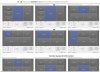
You could set it up as up to 8 seperate monitors and have 8 real desktops, not just split screens.

Multiple Virtual Monitors
https://elitetrader.com/et/threads/how-to-divide-a-4k-monitor-into-multiple-virtual-monitors.339480/
split-4k-monitor-multivirtuals.jpg split-4k-monitor-multivirtuals98.jpg
 
Back
Top