Yes. The source code for the traditional indicators can be found on Mario Fortier's website, the source of the advanced indicators is in the "indicators.c" file that comes with Zorro. The compiler includes this file to the strategy script by default, so you have access to all functions. A few functions, such as DominantCycle or Frechet Pattern Detection, are only binary included because the authors didn't want to disclose the source.Quote from HurricaneUS:
jcl,
Are the functions you referenced (fisher, lowpass, highpass, dominantcycle) already included with Zorro?
If so, are they open source?

You are using an out of date browser. It may not display this or other websites correctly.
You should upgrade or use an alternative browser.
You should upgrade or use an alternative browser.
Automated Trading Course - Part 2: Writing Strategies
- Thread starter jcl
- Start date
Today we'll learn how to improve a strategy's performance with optimization. That basically means that some essential strategy parameters are optimized to achieve the maximum profit for a certain bar period, asset, and market situation. That's why all better trade platforms have an optimizer, usually with an extra window or program outside the script. With Zorro, the script controls anything, and thus also determines which parameters are optimized in which way.
Alice's has added some commands to the strategy for parameter optimization (select Workshop5_2):
Parameter optimization requires some additional settings at the begin of the script:
set(PARAMETERS);
BarPeriod = 240;
LookBack = 500;
PARAMETERS is a "switch" that, when set, tells Zorro to generate and use optimized parameters. LookBack must be set to the 'worst case' lookback time of the strategy. The lookback time is required by the strategy for calculating its initial values before it can start trading. It's usually identical to the maximum time period of functions such as HighPass() or Fisher(). If the lookback time depends on an optimized parameter, Zorro can not know it in advance; so we should make it a habit to set it directly through the LookBack variable when we optimize a strategy. In this case we set it at 500 bars to be on the safe side.
The signal calculation algorithm now also looks a little different:
var Threshold = optimize(1, 0.5, 2);
var DomPeriod = DominantPeriod(Price, 30);
var LowPeriod = LowPass(DomPeriod, 500);
var *HP = series(HighPass(Price, LowPeriod * optimize(1, 0.5, 2)));
var *Signal = series(Fisher(HP, 500));
Stop = optimize(2, 1, 10) * ATR(100);
Some parameters have now been replaced by optimize function calls. We also notice that the line with the Threshold variable has now moved to the begin of the code. This is because more important parameters should be optimized first, and the most important is Threshold which determines the sensitivity of the strategy and has the largest influence on its profit. It is now set to the return value of the optimize function. optimize is called with 3 numbers; the first is the parameter default value, which is 1 - just the value that Threshold had before. The next two numbers, 0.5 and 2, are the parameter range, i.e. the lower and upper limit of the Threshold variable. So Threshold can now have any value from 0.5 to 2. During the optimization process, Zorro will try to find the best value within this range.
Alice has selected two more parameters to be replaced by optimize calls: a factor for the HighPass time period, and a factor for the stop loss distance. The default values are just the values used in the first version of the counter trading script. Theoretically, there could be even more parameters to optimize - for instance the DominantPeriod cutoff value, or the number of bars for the ATR function. But the more parameters we have, and the larger their range is, the higher is the danger of overfitting the strategy. Overfitted strategies perform well in the simulation, but poor in real trading. Therefore only few essential parameters should be optimized, and only within reasonable parameter ranges.
For training the strategy, click [Train] and observe what the optimize calls do. During the training phase, which can take about one minute depending on the PC speed, you'll see the following charts pop up:
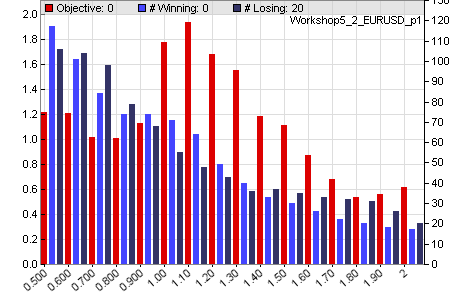
Parameter 1 (Threshold)
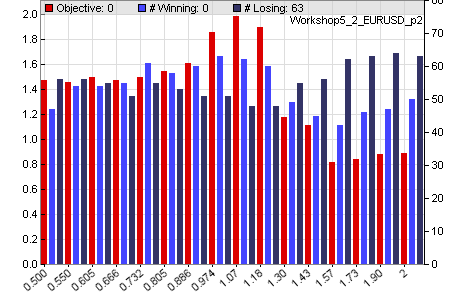
Parameter 2 (LowPeriod factor)
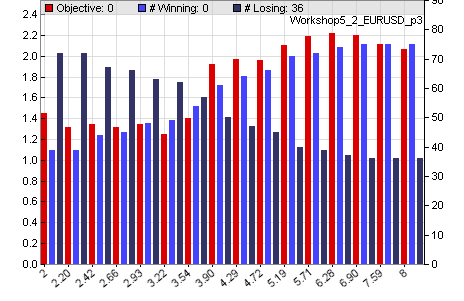
Parameter 3 (Stop factor)
The parameter charts show how the parameter values affect the performance of the strategy. The red bars are the profit factor of the training period - that is the total win divided by the total loss. The dark blue bars are the number of losing trades and the light blue bars are the number of winning trades. We can see that Threshold has two profit maxima at 1.10 and 1.50; the LowPeriod factor has a maximum slightly above 1. The Stop factor - the 3rd parameter - has a maximum at about 7. We can also see that a distant stop, although it increases the risk, also increases the number of profitable trades, the 'accuracy' of the strategy.
The 3 optimized parameters are stored in the file Data/Workshop5_2_EURUSD.par. Different parameter sets could be generated for other assets. A click on [Test], then on [Result] displays the equity chart of the optimized strategy:
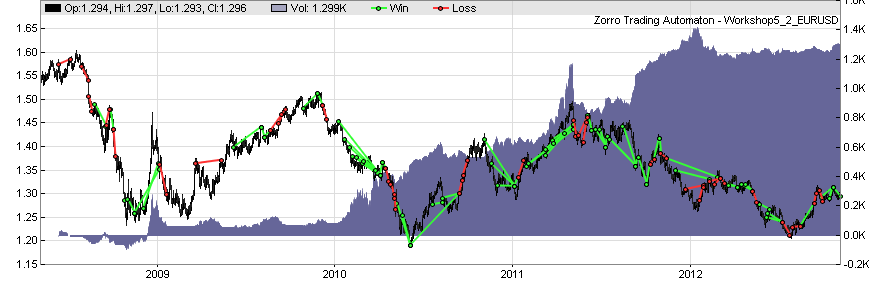
We can see how training has improved the script. The annual return now exceeds 200%, meaning that the invested capital doubles every 6 months. The new Sharpe Ratio is well above 1, meaning that this strategy is really tradable. Or is it? Well, in fact it's too good to be true. If Alice would deliver the strategy with this test result, she would have made a severe mistake and Bob would probably not get as rich as expected. What's the problem?
Alice has used the price data from the last 4 years for optimizing the parameters, and has used the same price data for testing the result. This always generates a too optimistic result due to curve fitting bias. It also has a second problem. In 4 years, markets change and trading strategies can become unprofitable. It is not recommended to trade an optimized strategy unchanged for 4 years. Normally the strategy parameters should be re-optimized in regular intervals for adapting them to the current market situation. Zorro can do that automatically while life trading, but how can we simulate this in a test and get some realistic prediction of the real trading behavior?
The answer is Walk-Forward Optimization. That will be our topic for tomorrow.
Please post here if there are questions or something is unclear.
Alice's has added some commands to the strategy for parameter optimization (select Workshop5_2):
Code:
function run()
{
  set(PARAMETERS);  // generate and use optimized parameters
  BarPeriod = 240;  // 4 hour bars
  LookBack = 500;   // maximum time period

// calculate the buy/sell signal with optimized parameters
  var *Price = series(price());
  var Threshold = optimize(1.0,0.5,2,0.1);
  var *DomPeriod = series(DominantPeriod(Price,30));
  var LowPeriod = LowPass(DomPeriod,500);
  var *HP = series(HighPass(Price,LowPeriod*optimize(1,0.5,2)));
  var *Signal = series(Fisher(HP,500));
  Stop = optimize(2,1,10) * ATR(100);

// buy and sell
  if(crossUnder(Signal,-Threshold))
    enterLong();
  else if(crossOver(Signal,Threshold))
    enterShort();

  PlotWidth = 1000;
  PlotHeight1 = 300;
}
Parameter optimization requires some additional settings at the begin of the script:
set(PARAMETERS);
BarPeriod = 240;
LookBack = 500;
PARAMETERS is a "switch" that, when set, tells Zorro to generate and use optimized parameters. LookBack must be set to the 'worst case' lookback time of the strategy. The lookback time is required by the strategy for calculating its initial values before it can start trading. It's usually identical to the maximum time period of functions such as HighPass() or Fisher(). If the lookback time depends on an optimized parameter, Zorro can not know it in advance; so we should make it a habit to set it directly through the LookBack variable when we optimize a strategy. In this case we set it at 500 bars to be on the safe side.
The signal calculation algorithm now also looks a little different:
var Threshold = optimize(1, 0.5, 2);
var DomPeriod = DominantPeriod(Price, 30);
var LowPeriod = LowPass(DomPeriod, 500);
var *HP = series(HighPass(Price, LowPeriod * optimize(1, 0.5, 2)));
var *Signal = series(Fisher(HP, 500));
Stop = optimize(2, 1, 10) * ATR(100);
Some parameters have now been replaced by optimize function calls. We also notice that the line with the Threshold variable has now moved to the begin of the code. This is because more important parameters should be optimized first, and the most important is Threshold which determines the sensitivity of the strategy and has the largest influence on its profit. It is now set to the return value of the optimize function. optimize is called with 3 numbers; the first is the parameter default value, which is 1 - just the value that Threshold had before. The next two numbers, 0.5 and 2, are the parameter range, i.e. the lower and upper limit of the Threshold variable. So Threshold can now have any value from 0.5 to 2. During the optimization process, Zorro will try to find the best value within this range.
Alice has selected two more parameters to be replaced by optimize calls: a factor for the HighPass time period, and a factor for the stop loss distance. The default values are just the values used in the first version of the counter trading script. Theoretically, there could be even more parameters to optimize - for instance the DominantPeriod cutoff value, or the number of bars for the ATR function. But the more parameters we have, and the larger their range is, the higher is the danger of overfitting the strategy. Overfitted strategies perform well in the simulation, but poor in real trading. Therefore only few essential parameters should be optimized, and only within reasonable parameter ranges.
For training the strategy, click [Train] and observe what the optimize calls do. During the training phase, which can take about one minute depending on the PC speed, you'll see the following charts pop up:
Parameter 1 (Threshold)
Parameter 2 (LowPeriod factor)
Parameter 3 (Stop factor)
The parameter charts show how the parameter values affect the performance of the strategy. The red bars are the profit factor of the training period - that is the total win divided by the total loss. The dark blue bars are the number of losing trades and the light blue bars are the number of winning trades. We can see that Threshold has two profit maxima at 1.10 and 1.50; the LowPeriod factor has a maximum slightly above 1. The Stop factor - the 3rd parameter - has a maximum at about 7. We can also see that a distant stop, although it increases the risk, also increases the number of profitable trades, the 'accuracy' of the strategy.
The 3 optimized parameters are stored in the file Data/Workshop5_2_EURUSD.par. Different parameter sets could be generated for other assets. A click on [Test], then on [Result] displays the equity chart of the optimized strategy:
We can see how training has improved the script. The annual return now exceeds 200%, meaning that the invested capital doubles every 6 months. The new Sharpe Ratio is well above 1, meaning that this strategy is really tradable. Or is it? Well, in fact it's too good to be true. If Alice would deliver the strategy with this test result, she would have made a severe mistake and Bob would probably not get as rich as expected. What's the problem?
Alice has used the price data from the last 4 years for optimizing the parameters, and has used the same price data for testing the result. This always generates a too optimistic result due to curve fitting bias. It also has a second problem. In 4 years, markets change and trading strategies can become unprofitable. It is not recommended to trade an optimized strategy unchanged for 4 years. Normally the strategy parameters should be re-optimized in regular intervals for adapting them to the current market situation. Zorro can do that automatically while life trading, but how can we simulate this in a test and get some realistic prediction of the real trading behavior?
The answer is Walk-Forward Optimization. That will be our topic for tomorrow.
Please post here if there are questions or something is unclear.
Quote from clearinghouse:
Pardo's book reads like this, but I don't think this post is plagiarism.
In Pardo's book, they have a dialogue between a trader and a programmer. The trader is all like:
According to the Zorro website, jcl is the author of these scenarios.
http://www.zorro-trader.com/manual/en/tutorial_var.htm
Of course, I'm assuming that the user jcl there is the same user as jcl here
 Anyway, this is a great thread, thank you jcl. Had it not been for you, I would never have known about the Zorro project. I'm looking forward to your insights.
Quote from jcl:
Yes. The source code for the traditional indicators can be found on Mario Fortier's website, the source of the advanced indicators is in the "indicators.c" file that comes with Zorro. The compiler includes this file to the strategy script by default, so you have access to all functions. A few functions, such as DominantCycle or Frechet Pattern Detection, are only binary included because the authors didn't want to disclose the source.
that's fine I have the source code for dominant cycle laying around here somewhere...actually spoke to ehlers some years ago and have the source codes for his functions deep in the bowels of one of my computers. if I'm not mistaken I believe it's all included in Rocket Science for Traders for those looking for his indicators source codes. thx. great thread
Quote from jcl:
Yes. The source code for the traditional indicators can be found on Mario Fortier's website, the source of the advanced indicators is in the "indicators.c" file that comes with *****. The compiler includes this file to the strategy script by default, so you have access to all functions. A few functions, such as DominantCycle or Frechet Pattern Detection, are only binary included because the authors didn't want to disclose the source.
Mario Fortier's is the author of TA-LIB right..? Are you using this library for creating scripts from it...?
Thank you very much, I subscribe for download link on your page, but i do not recieve anything yet.

Great project. Lite-C is the WAY to go... Amibroker AFL's success was in part of the easy of "scripting" programming way.
Cheers....
