

AMP_Futures
ET Sponsor
Webinar - Learn What's New-CQGM | Optimized for Trading on your Phone!
Today – March 9, 2015 @ 3:30pm CST (Video Preview)
Webinar Room will Open at 2:30pm CST - Join us to Learn More about CQGM | Mobile Trading Technology and Features >>
Duration: Approximately 1 hour per session
CQG launched a new mobile mode for CQGM (mobile) Trading Platform.
CQG is excited about this release because we have been getting a lot of positive feedback from early users, and we think it really improves the CQG M experience on phones.
In our initial launch of CQG M, we presented all pages and widgets in the left bar when logging on from your phone. It made navigation a bit confusing. In this new version, we designed the navigation specifically for phones and included just the features you need on your phone.
Here's an overview:
You can try it out by going to CQGM Demo from your phone and requesting a demo account, if you don't already have one, orCQGM Live LogIn with your live AMP trading account. (All AMP CQG Live Accounts enabled with CQGM by default & for FREE)
Thanks to the CQG design, development, ops, and support teams for making this happen. If you have any questions or issues, please e-mail us at trading@ampfutures.com
There is a risk of loss in trading futures, forex and options. Futures, forex and options trading are not appropriate for all investors.
Today – March 9, 2015 @ 3:30pm CST (Video Preview)
Webinar Room will Open at 2:30pm CST - Join us to Learn More about CQGM | Mobile Trading Technology and Features >>
Duration: Approximately 1 hour per session
CQG launched a new mobile mode for CQGM (mobile) Trading Platform.
CQG is excited about this release because we have been getting a lot of positive feedback from early users, and we think it really improves the CQG M experience on phones.
In our initial launch of CQG M, we presented all pages and widgets in the left bar when logging on from your phone. It made navigation a bit confusing. In this new version, we designed the navigation specifically for phones and included just the features you need on your phone.
Here's an overview:
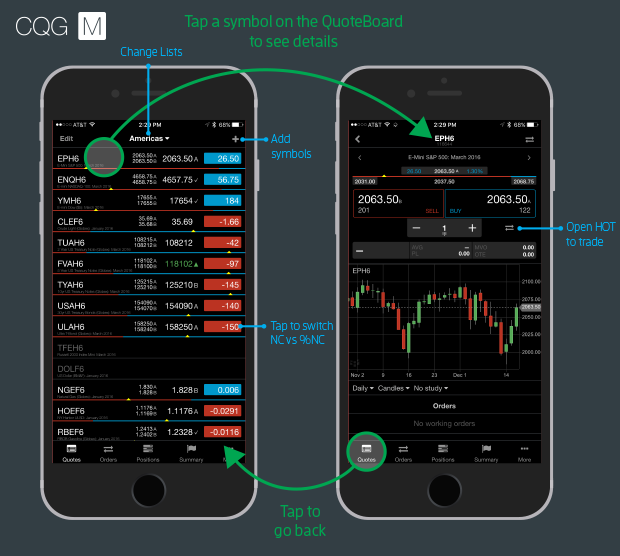
- The main screen includes the quote list with bid, ask, last trade, and net change.
- Tap a symbol to see its details page with trading at the bid/ask, orders and positions for that symbol, and a chart.
- Tap the HOT button to trade from the price scale.
- Tap the quotes button in the nav at the bottom to go back.
- Tap the buttons in the nav at the bottom to see all orders and positions across all symbols and your account summary.
- Change your account on the account summary screen.
- Access preferences in the menu on the bottom right.
You can try it out by going to CQGM Demo from your phone and requesting a demo account, if you don't already have one, orCQGM Live LogIn with your live AMP trading account. (All AMP CQG Live Accounts enabled with CQGM by default & for FREE)
Thanks to the CQG design, development, ops, and support teams for making this happen. If you have any questions or issues, please e-mail us at trading@ampfutures.com
There is a risk of loss in trading futures, forex and options. Futures, forex and options trading are not appropriate for all investors.