
You are using an out of date browser. It may not display this or other websites correctly.
You should upgrade or use an alternative browser.
You should upgrade or use an alternative browser.
Adjust volume chart height
- Thread starter rodras
- Start date
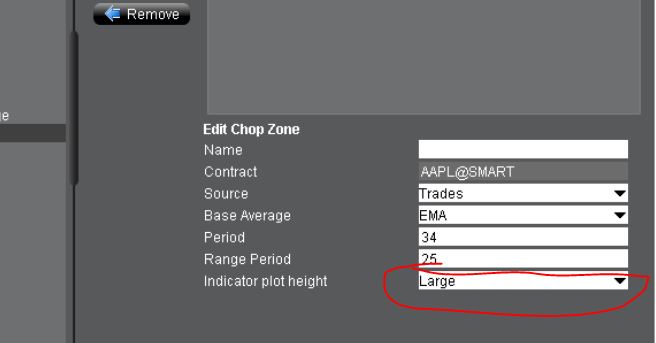
Thanks Guru.You can only select small/medium/large in chart settings:
View attachment 225557
Do you know if there's a way to reduce/adjust the studies displayed below the price chart?
Same method with studies... you have a choice between Large Medium and Small. When you're in the Chart Parameters' Studies tab, on the right you set the plot height.
What I would like to know is how to remove / hide study legends in subcharts. You can hide the legend in the main chart (ex: EMAs, VWAP) but not in small subcharts underneath (Volume, Stochastic)? It crowds the chart when the charts are smaller and you have many of them on each monitor. Thx.
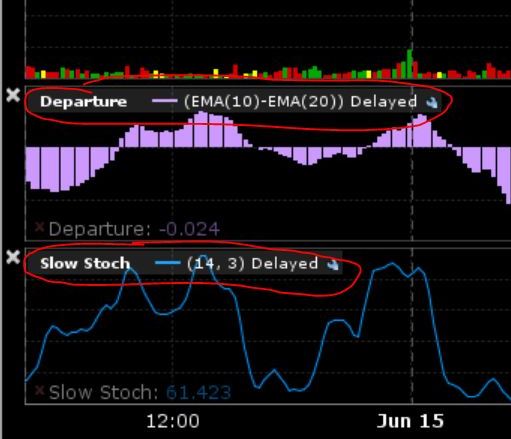
What I would like to know is how to remove / hide study legends in subcharts. You can hide the legend in the main chart (ex: EMAs, VWAP) but not in small subcharts underneath (Volume, Stochastic)? It crowds the chart when the charts are smaller and you have many of them on each monitor. Thx.
Last edited:
Thanks graz.Same method with studies... you have a choice between Large Medium and Small. When you're in the Chart Parameters' Studies tab, on the right you set the plot height.
What I would like to know is how to remove / hide study legends in subcharts. You can hide the legend in the main chart (ex: EMAs, VWAP) but not in small subcharts underneath (Volume, Stochastic)? It crowds the chart when the charts are smaller and you have many of them on each monitor. Thx.
Regarding the study's legend I don't know as well, but if I manage to find a way I'll tell you for sure
I have another question about the Studies subchart display. Is there a way to reorder the studies that are below the main chart? I see they're locked into alphabetical order as far as I can see (excluding the built-in Volume indicator which is always above all other subchart indicators) Thx.
Last edited:
I never notice that (i use only one subchart), but in fact the studies ordering system seems to be locked. Even changing their names doesn't produce any effect.I have another question about the Studies subchart display. Is there a way to reorder the studies that are below the main chart? I see they're locked into alphabetical order as far as I can see (excluding the built-in Volume indicator which is always above all other subchart indicators) Thx.
I never notice that (i use only one subchart), but in fact the studies ordering system seems to be locked. Even changing their names doesn't produce any effect.
I tried to change the name as well to reorder. Changing the name makes it's legend even bigger. Oh well. Thanks for confirming.